
The Essentials:
The Vehicle for Connection
Content Strategy Framework Lesson
4/6
This module discusses how to create and curate audience-centric material that brings value to the people you’re trying to reach. You’ll learn best practices for digital messaging and discover how to structure your content to guide individuals toward their next spiritual step.
Content
In the digital mission field, we don’t want to simply generate activity and add to noise online. We want to make a spiritual impact, to see lives changed. So to keep what we produce and post from being aimless digital content, we use the five components of the Content Strategy Framework: Audience, Goal, Content, Distribution and Analysis.
Once you know exactly who you’re trying to reach (Audience) and where you’re taking them (Goal), you must build the path they will walk. That path is your Content.
This section introduces the Content component of the framework, exploring content’s definition, audience-centricity, the planning process and best practices for creating digital material and messaging that move people toward Jesus.
What is Content?
Content is the substance of your strategy. Everything your audience sees, hears, reads, clicks — that’s content. It is everything that communicates.
Content includes but is not limited to:
- Articles
- Videos
- Captions
- Video descriptions
- Podcasts
- Images
- Social media posts
- Titles, headlines and subheadings
- Invitations to events
- Ads
- Hyperlinked text
- Text on a clickable button
Good content not only captures the audience’s attention, it also meets an audience’s need, connects to people emotionally and fulfills its promise.
How Does Content Connect to the Content Strategy Framework?
Audience
Your audience dictates what kind of content you need to create and how you communicate it. To be effective, you must tailor content to their specific needs, language and cultural context. This allows you to genuinely connect to your audience.
Goal
The goal acts as your destination, while content serves as the vehicle or pathway that gets the person there. Every piece of content you build must include a clear call to action (CTA) that intentionally guides the audience toward that defined goal.
Distribution (Sharing Methods)
Content and distribution function together. You must format content to fit the platforms your audience uses, while also selecting distribution channels that can properly deliver your specific content.
Analysis
Analytics measure the direct effectiveness of your content by revealing where people engage and where they drop off. By reviewing this data, you can uncover, for example, whether your content’s hook, message, or CTA needs to be iterated to better serve your audience.
Centering Content on the Audience
The most beautiful, creative content will be ineffective if it isn’t contextualized to the people you’re trying to reach.
1. Content that resonates
If you create content for everyone, it reaches no one. When you try to reach everyone online with the same message, the messaging is generic. The message can therefore appear vague and irrelevant to the audience. Because of that, generic messaging won’t resonate as well with your audience’s needs, challenges or desires.
We’ve created tools to guide you through the process of knowing your audience. By utilizing the Guide to Understanding Your Audience (PDF), we move beyond generic broadcasting to specific, empathetic engagement that meets people where they are, rather than where we want them to be.
The elements of knowing your audience make up the foundation you’ll need for designing a user journey, which we discuss later in this module.
A reminder: Content is not a microphone to proclaim your ministry’s message with more volume; rather, it’s an opportunity for you to bring genuine value to your audience.
True audience-centricity means finding the “sweet spot” — the place where your audience’s felt needs intersect with what your ministry has to offer. When you listen deeply to your audience and adapt thoughtfully to their context, language and pain points, you shift your posture from “convincing” to “connecting.” You’re then engaging them with a message on a deeper level.
This is also an opportunity to be creative and create content that helps your audience take a step toward Jesus and/or take a step with your ministry. There are countless ways to create content to help people take a spiritual step — it doesn’t always have to be a gospel presentation.
2. A Consistent Voice and Tone
Whether your content is a video, an article, a social media post or even a title or a caption, the content must use a consistent Voice and Tone that represents Jesus and resonates with the audience. Our voice and tone can either build a bridge or become a barrier to our mission.
Voice is the style of language or personality you use to speak to your audience.
Tone represents the emotions and mood your language conveys, which changes based on the situation, the audience and/or the message. It’s how you empathize with your audience.
Whether online or offline, the voice of Campus Crusade for Christ International is:
- Clear: Knowing who we are and what we are called to do.
- Unifying: Understanding our globally shared calling as a movement of diverse national ministries called to help fulfill the Great Commission.
- Passionate: Knowing the Lord will provide fruit through winning, building and sending in the power of the Holy Spirit and helping the body of Christ do evangelism and discipleship.
- Empowering: Grounding us in our goal to serve and strengthen national ministries across the globe.
The tone of Campus Crusade changes based on the situation, audience and message. Tone is how we empathize with our audience. Regardless, we are welcoming, confident and wise in how we speak with others, offline and online.
Important Notes
- Avoid insider language: Don’t assume our readers know much about Campus Crusade for Christ, being a multiplying disciple or the Christian faith. We must intentionally avoid internal Campus Crusade jargon and insider Christian vocabulary. These terms can easily isolate and alienate individuals who do not have a Christian background. When using more advanced spiritual terms, such as “salvation” or “justification,” we must define them in order to care for our audience.
- Respect audience reading level: The average reading level online is late primary school or early secondary school. Use simple words and keep sentences short.
Examples of Simpler Language (adapted from Cru’s Content Development Guide)
To effectively reach our audiences, we translate common Christian terms into simpler language that anyone can understand:
- Instead of “accept Christ” or “receive Christ” use “become a follower of Jesus” or “trust in Jesus”
- Instead of “evangelism” use “sharing Jesus’ message of love and forgiveness”
- Instead of “lost” use “not a follower of Jesus” or “non-Christian”
- Instead of “sin” use “rebelling against or disloyal to God”
- Instead of “quiet time” or “devotions” use “time spent with God”
- Instead of “filled with the Holy Spirit” use “empowered by God”
Voice and Tone Examples
While Campus Crusade for Christ International has a specific overarching voice and tone, every ministry within Campus Crusade must contextualize the voice and tone to their audience. Read more Campus Crusade-related examples in our Voice and Tone Guide (PDF).
Planning Your Content
Though planning your content takes time and energy, it provides you with focus and clarity before creation, saving you even more time and energy. Planning simplifies content creation, and you’ll thank yourself for doing the front-end work. As a bonus, the process of planning will help you generate specific and thorough AI prompts, which can save you time and energy in the content creation phase. In the points below, we’ve compiled the essentials for planning.
Determine your Audience, User Story and Goals
As we’ve mentioned, understanding your audience is vital for making decisions about what images, language and content you’ll use. Our Understanding Your Audience (PDF) activities will guide you in this.
Brainstorm Content: Key Questions for Curation and Creation
As you consider your audience and your objective, ask yourself these key questions:
- What types of content do you need for this user journey or digital campaign? (Short videos, articles, social media posts, podcast episodes, titles, captions, images, etc.)
- Where does your target audience spend most of their time? How do they consume content? For example, if your audience primarily uses TikTok, creating longform articles may not serve them as well.
- You don’t always have to create content from scratch. Is there content that already exists in our ecosystem (e.g., from the Jesus Film Project, Sightline, or from another national ministry’s website) that you can use as a starting place?
- If so, what changes will you need to make to this content so that it serves the specific audience you’re trying to engage?
- What new content do you need to create to accomplish your goal?
User Journeys: Mapping and Connecting Your Content Pieces
A user journey, also known as a content journey, is a designed pathway or sequence of experiences that helps an individual move from a point of curiosity or need toward a specific goal. It involves taking your audience step by step through a digital path, guiding them from one call to action (CTA) to another. We discuss user journeys more deeply in the User Journey course.
Following your user story, order your content in a sequence. Think of this like you’re creating a map or drawing a storyboard. Is there a natural flow from one piece of content to the next?
You can order your content based on the commitment you’re asking of your user, i.e., how much perceived risk the audience must take. Think about it this way: If you ask a person you just met to attend an event, their attendance is riskier to them because they’ve never interacted with you, they don’t know if they trust you yet. But if their friend invites them to the same event, the risk is lower because a level of trust has already been established between them.
Online, we operate similarly. So we place the easiest-to-consume content and lower-risk CTA at the beginning of the user journey. This approach builds rapport and trust.
For example, a lower-risk, lower-commitment CTA online is asking your audience to like a post or watch a short video. As the person moves further through the journey, you can introduce larger commitments or higher-risk CTAs, such as asking them to sign up to attend an event or meet with a mentor.
Follow the three-part content flow:
1. The Hook (The Beginning): Content designed to grab attention, spark curiosity, and/or make the user feel seen and understood right away. It could be a short video, a compelling question or an intriguing image. For an article, your hook starts with your title. Your hook is a promise you make to the audience, and you’ll fulfill that promise through the message and call to action.
2. The Message (The Middle): The section that explores the heart of your theme. This provides value, such as a personal story or Scripture, without overloading the user with information.
3. The Call to Action (The End): A clear, specific and inviting next step directly tied to your goal. Without a clear CTA, you miss a vital opportunity for connection. Every piece of content should include a call to action.
Below is an example of a quick, mapped-out Instagram user journey. Each content piece has at least a hook and a CTA.
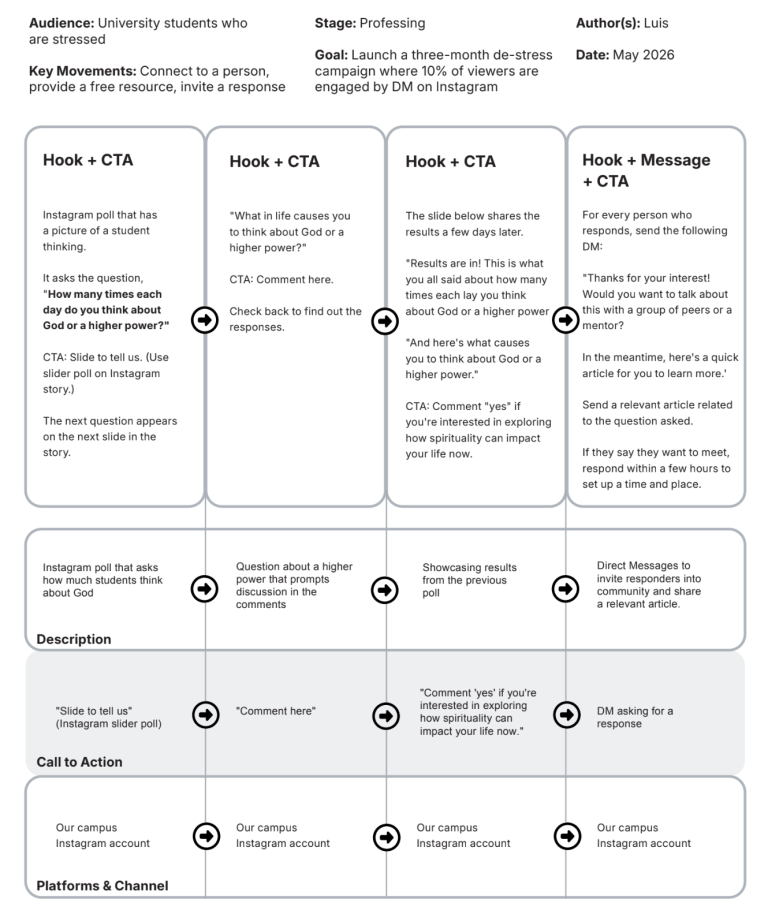
By storyboarding these pieces before building them, you ensure your content remains tightly focused on your intended goal. The User Journey Template (PDF) will help you storyboard.
Defining Your Content
Example questions to answer — taken from our Content Creation Guide (PDF) — include:
- What type of content are you using? (Caption, video, video description, podcast, image, social media post, article, title, call to action, button text, etc.)
- What does this content require? What other components are needed? (Caption, video, video description, podcast, image, social media post, article, title, call to action, button text, etc.)
- What topics should this new content include?
- What does this content need to avoid? (For example, don’t mention the names of other religions or religious texts.)
- What timing do you need to consider? (For example, national or religious holidays, academic calendar, etc.)
- What are the visual needs? (Background image, photo of people, supplemental video or B-roll, etc.)
The Dos and Don’ts of AI in Content Creation
Artificial Intelligence can be a massive time-saver, but it must be used safely and correctly. Campus Crusade for Christ has created a document to capture our AI guiding principles for ministry.
- DON’T let AI become your content creator in place of you.
- DON’T use generic prompts. A prompt like “Write something about dogs” will yield unhelpful results. Iterate the prompt to achieve your desired outcome. If the output isn’t right, ask AI to adjust: “That was too formal. Can you rewrite it in a more casual and friendly tone?”
- DON’T blindly publish. Always check AI-generated work for grammar, spelling, accuracy, theology, plagiarism, voice and tone. AI is not the Holy Spirit, and AI does not replace human empathy.
- DO use AI as your creative assistant.
- DO write specific prompts that include four key elements: A goal/output, an audience, helpful context (platform, voice/tone), and exactly what you want the tool to do. For example: “Write a short, engaging social media post (under 280 characters) about the benefits of adopting a dog, targeting young adults.”
- DO a thorough edit of AI-generated content so that it sounds human and is accurate, which are essential for building trust and credibility with your audience.
Quick Principles for Digital Content
Below, we provide principles for each main type of digital content.
Web Articles
How people consume content online is vastly different from reading a book; they scan content to find what they want and demand directness. To write effectively for the web:
- Make it Scannable: Use short chunks of substance-rich text (50-75 characters per line), plenty of white space, and bulleted or numbered lists.
- Prioritize Information: Answer the user’s question at the very beginning, put the most important information first, and ruthlessly cut out excess words.
- Respect the Reading Level: Online audiences read at a late primary school or early secondary school level. Use simple 1-2-syllable words, keep sentences short, and use the active voice (where the subject is doing the action).
- Avoid “Christianese”: Simplify your language and avoid insider Christian jargon that would alienate someone with no biblical background.
Short Videos
- Plan and Script: The biggest difference between professional Hollywood content and amateur video is the level of planning. Pick one specific subject and write a script or basic outline. This helps the person being filmed to practice and ensures they are concise, preventing them from rambling.
- Lighting and Audio: These are the two hardest things to manage without expensive gear. But even with a few pieces of inexpensive gear and intentional planning, you can create quality video content. Ensure your subject is well-lit so viewers can clearly see their emotions and eye movements. Try to film in a quiet place without distracting background noise, or consider getting an inexpensive lapel microphone to better capture your sound.
- Composition: Study the “rule of thirds.” Try to align your subjects along the vertical and horizontal lines, or their intersections, rather than putting them smack-dab in the middle of the frame, which is considered boring. Create depth by increasing the distance between your subject and the background.
- Movement: Be deliberate with camera movements rather than randomly panning. Make sure your movements communicate the right emotion; for example, use smooth movements to highlight a vulnerable testimony, avoiding erratic shaking that disorients the viewer.
Visuals and Images
Visuals must work together with your text or audio to tell a cohesive story.
- Ask yourself: Who is the audience? What is the goal of the content? What is the platform? What emotion do we want to convey?
- For web formatting, standard tiles and main article images should follow a 16:9 ratio.
- Develop a system to use authentic photos of real people in your ministry, avoiding overused stock photos. If you take photos to use on your channels, please make sure you get permission through a release form if showing the person’s face.
If you are a staff member, you have access to ministry visuals through the global photo gallery on Workvivo. And here are photography guidelines and photo permission forms (known as model release forms).
Title and Captions
- Captions: A caption should provide the reader with the basic information needed to understand a visual. Be concise and utilize relevant keywords.
- Titles: Avoid “clickbaity” language (like explicitly demanding people to “follow,” “like,” or “share” for no reason), as social media algorithms often demote these posts. In social media, always include a clear call to action in the description.
A Final Thought
In this module, we’ve focused on principles of online content and the repeatable process of creating content for user journeys. For your day-to-day and ongoing content needs, we have more resources and connection points for you.
Want to hear more about what others are creating? Or need ideas for content? Post a question in one of our Global Digital Strategies groups.
Are you ready to think about developing content in an ongoing way for your social media channels? Use our Content Calendar Template (PDF) to plan your content in advance.
Also, on our Tools for Content Strategy page, you can request access to Metricool — our global platform for social media management that allows you to schedule posts, manage multiple channels and analyze engagement across platforms.